When outlook 2016 keeps prompting for password
Created: 2019-05-01 00:32:32 | Last modified: 2019-05-01 01:05:19 | By: NovaAccess: Read | Visibility: Public, Users | Views: 181 | Rating: N/A | Tags: outlook outlook 2016 exchange server exchange outlook
When using outlook 2016 (CSP/365) with on on premise server, it keeps prompting for a password or a sign in to Microsoft
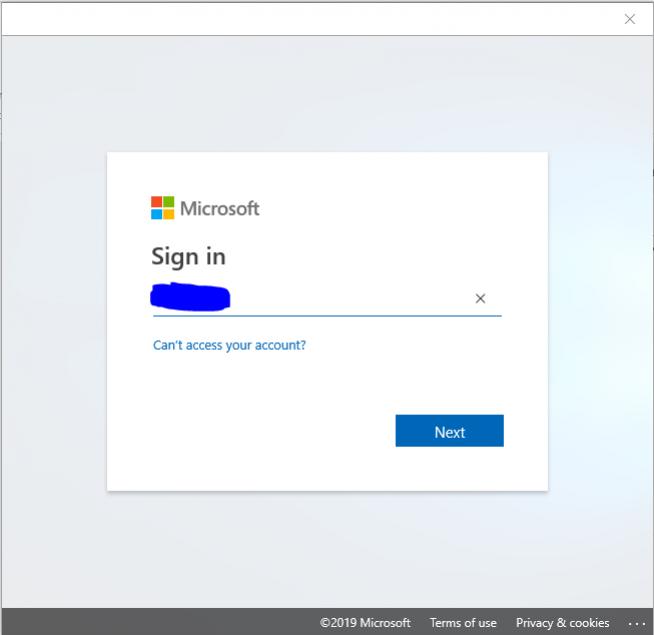
When Outlook 2016 CSP keeps prompting for you to sign in to Microsoft, if you have signed in using your CSP/365 credentials and are still getting the prompt the following might help. This can happen when you have an on premise exchange server (in this case 2019). You will get the popup as per below asking for your domain credentials. This is caused by a change in Outlook in which it looks for autodiscover information. It tries to go to your domain realm (e.g. yourdomain.com) to get its mailbox information.
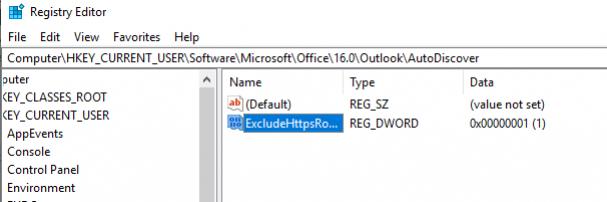
To fix this, you need to create a registry key. Open up the Registry Editor (type regedit into the start search).
Browse to HKEY_CURRENT_USER\Software\Microsoft\Office\16\Outlook\AutoDiscover
Create a new DWORD value and name it ExcludeHttpsRootDomain and set it a value of 1
Close out of outlook and open it again and you shouldn't see the popup happen again.
Note: If the above doesn't work, also try adding the following DWORD values with a value of 1
- ExcludeHttpsAutoDiscoverDomain
- ExcludeScpLookup