Create a user and provide SSH user ROOT permissions to Linux
Created: 2019-02-28 00:23:08 | Last modified: 2019-05-07 21:11:15 | By: NovaAccess: Read | Visibility: Public, Users | Views: 186 | Rating: N/A | Tags: ssh linux
Create a user and provide SSH user root permissions to CentOS Linux, without user having to sudo.
Option 1 - With sudo
Create a new user (this is done under root)
adduser thenewuser
Set the password for the new user
passwd thenewuser
Put the user into the wheel group (root group) (this can be skipped if the user is to be created as a 2nd root user)
usermod -a -G wheel thenewuser
Edit the user permissions (you need to know how to use Vim here).
Notes: vim you type "i" to insert the line, then ":wq" to write and quit. You can also ":q!" to quit without saving
visudo
Under the line which reads "root ALL=(ALL) ALL" add in the following
thenewuser ALL=(ALL) ALL
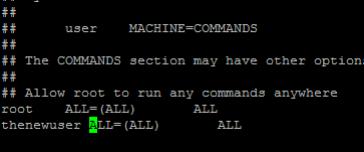
To use sudo, log in as the new user, you will now be able to run commands like the following (after a password prompt);
sudo -ls -la /root
Option 2 - Without sudo, full root access
Setting the user to have full root access without sudo (make as second root user)
This is done so sudo doesn't need to be used, this is not usually a recommended configuration as you would loose some protection by the increase of security level.
Notes: vim you type "i" to insert the line, then ":wq" to write and quit. You can also ":q!" to quit without saving
#Get the line number of the user inside the /etc/passwd file. This is highlighted in orange
grep -n thenewuser /etc/passwd
103:thenewuser:x:500:0::/home/thenewuser:/bin/bash

#Edit the file at this line number, change the part highlighted above in yellow to the following (0:0)
vim +103 /etc/passwd
thenewuser:x:0:0::/home/thenewuser:/bin/bash
You should now be able to log in as the above user and have full root access.