A SSH key pair allows remote access to a SSH session (Centos in this example) without the requirement for a username and password.
Step 1
As the logged in user, create the key pair, this will create a 2048 bit RSA key pair. By default it will place the file in /HOMEDIR/.ssh/id_rsa, you don't need to add a passphrase.
ssh-keygen
Step 2
Now that the key pair has been generated, you will want to allow certain hosts to connect to this server. To do this the clients public key needs to be added to the authorized_keys file. In this example we are using vim (you can also use nano or vi) to edit the file. If you are using Putty as a client, notes on creating a key pair is here
touch ~/.ssh/authorized_keys
chmod -R go=~/.ssh/authorized_keys
vim ~/.ssh/authorized_keys
Paste in the key. In this example I generated the public key with putty and then converted it manually as per below and then saved it into the authorized_keys file
---- BEGIN SSH2 PUBLIC KEY ----
Comment: "rsa-key-20190219"
ASD8G8IHAHJh89hasdg98asd9hnas89ga8h8HHAS89GAG8HAGHha89gdsa9hgeas
ASD8G8IHAHJh89hasdg98asd9hnas89ga8h8HHAS89GAG8HAGHha89gdsa9hgeas
ASD8G8IHAHJh89hasdg98asd9hnas89ga8h8HHAS89GAG8HAGHha89gdsa9hgeas
ASD8G8IHAHJh89hasdg98asd9hnas89ga8h8HHAS89GAG8HAGHha89gdsa9hgeas
ASD8G8IHAHJh89hasdg98asd9hnas89ga8h8HHAS89GAG8HAGHha89gdsa9hgeas
saegweasgagjesagjesagj8jasegjaseseag/ph6iB7au+waw==
---- END SSH2 PUBLIC KEY ----

TO

ssh-rsa ASD8G8IHAHJh89hasdg98asd9hnas89ga8h8HHAS89GAG8HAGHha89gdsa9hgeasASD8G8IHAHJh89hasdg98asd9hnas89ga8h8HHAS89GAG8HAGHha89gdsa9hgeasASD8G8IHAHJh89hasdg98asd9hnas89ga8h8HHAS89GAG8HAGHha89gdsa9hgeasASD8G8IHAHJh89hasdg98asd9hnas89ga8h8HHAS89GAG8HAGHha89gdsa9hgeasASD8G8IHAHJh89hasdg98asd9hnas89ga8h8HHAS89GAG8HAGHha89gdsa9hgeassaegweasgagjesagjesagj8jasegjaseseag/ph6iB7au+waw== root@localhost
Step 3
Connect to the server (in this example we will use Putty)
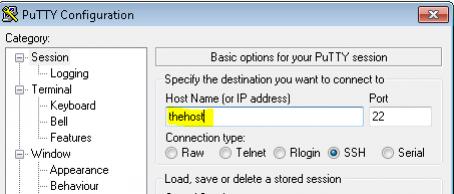
Open putty, enter in the host name into the Host Name field
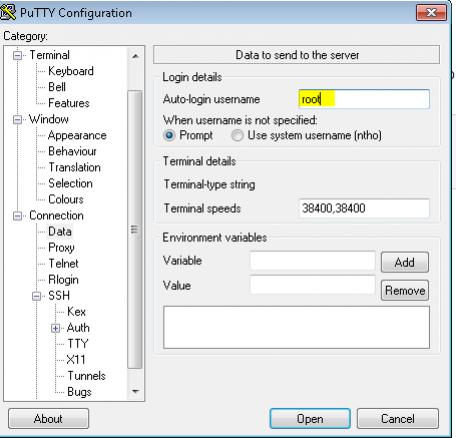
Select Connection => Data and enter in the username of the user which to log in as (same as the key you generated)
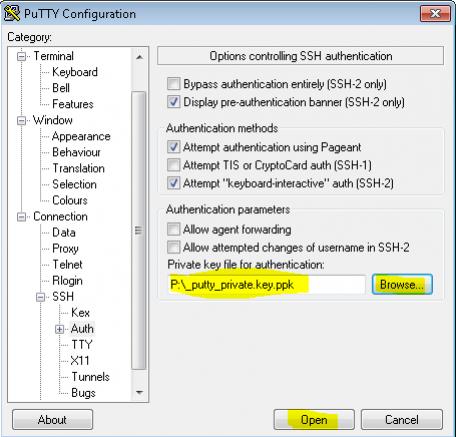
Select Connection => SSH => Auth and select the private key and then click open