Decreasing and Increasing Synology RAID performance
Created: 2018-08-07 22:17:44 | Last modified: 2022-03-13 00:28:00 | By: NovaAccess: Read | Visibility: Public, Users | Views: 713 | Rating: +1 | Tags: synology linux
A list of instructions with how to increase and decrease RAID performance with a Synology NAS when Expanding an array
When expanding a Synology array and can take a lot of resouces away from normal processes and reducing performance. A way to fix this is to reduce the reshape speed.
Step 1: Logging into the diskstation via SSH (putty):
Step 2: Check current speed: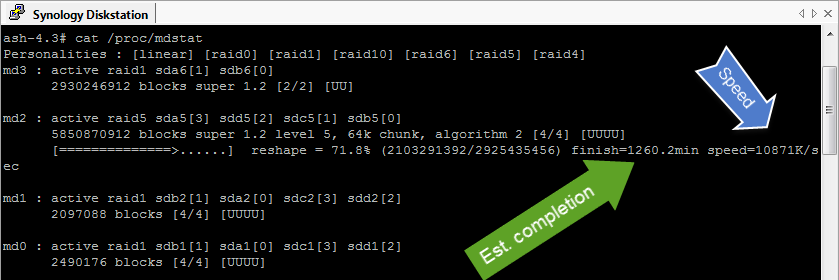
Step 3: Check current throttle values: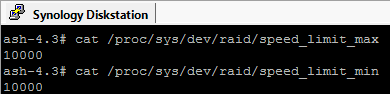
Step 4: Increase the throttle values to 250MB:
Step 5: See results
For Synology OS < 6.0, login with
User: root

For Synology OS > 6.0, login with
User: admin
sudo su -
The following displays the current speeds
#> cat /proc/sys/dev/raid/speed_limit_max
200000
#> cat /proc/sys/dev/raid/speed_limit_min
10000

The following reduces the speed to 100B/S, you will need to increase this back once load requirements reduce
#Slow Down
echo 10000 > /proc/sys/dev/raid/speed_limit_min
echo 200000 > /proc/sys/dev/raid/speed_limit_max

#Revert Back
echo 50 > /proc/sys/dev/raid/speed_limit_min
echo 100 > /proc/sys/dev/raid/speed_limit_max

#Check the status
#> cat /proc/mdstat
Personalities : [linear] [raid0] [raid1] [raid10] [raid6] [raid5] [raid4]
md2 : active raid6 sdl3[11] sdk3[10] sdj3[9] sdi3[8] sdh3[6] sda3[0] sdf3[5] sde3[4] sdd3[3] sdc3[2] sdb3[1]
      46845603328 blocks super 1.2 level 6, 64k chunk, algorithm 18 [11/11] [UUUUUUUUUUU]
      [================>....]  reshape = 82.0% (4802034432/5855700416) finish=313591.0min speed=55K/sec

md1 : active raid1 sdl2[10] sdk2[9] sdj2[8] sdi2[7] sdh2[6] sda2[0] sdb2[1] sdc2[2] sdd2[3] sde2[4] sdf2[5]
      2097088 blocks [12/11] [UUUUUUUUUUU_]

md0 : active raid1 sdl1[10] sdk1[9] sdj1[8] sdi1[7] sdh1[6] sda1[0] sdb1[1] sdc1[2] sdd1[3] sde1[4] sdf1[5]
      2490176 blocks [12/11] [UUUUUUUUUUU_]

unused devices: <none>